

English
AeroStream H19 Manual
MODEL NAME
-
VSE-ASH19
-
VSE-ASH19-EU
-
VSE-ASH19-UK
-
VSE-ASH19-AU
Safety Information
Please read the following instructions carefully before using this device. Failure to observe these safety instructions may result in injury and will release VIVOSUN of all liability and void all product warranties.
IMPORTANT SAFETY INFORMATION:
-
Ensure that your power source meets the electrical requirements specified for this product.
-
Familiarize yourself with all instructions before proceeding with the installation and operation of this product.
-
Do not dismantle or attempt to repair or adjust the unit without authorization, as this will invalidate the product’s warranty.
-
Use ONLY distilled water and avoid pouring water into the central pipe to maintain proper functionality of this device.
-
Always turn off and unplug the humidifier before installing, cleaning, or moving it. When not in use, unplug the humidifier from the power outlet.
-
Do not touch the water in the tank or any components in the water with any part of your body while the humidifier is operating.
-
Do not operate the humidifier without water. Doing so may damage the unit.
-
Do not direct the mist outlet towards electrical appliances, such as clip-on fans, lights, or inline fans.
-
Do not cover power cords with rugs or other fabric materials.
-
When cleaning, do not allow water to flow or splash into the interior of the unit to avoid damaging internal components.
-
Do not place this product in potentially hazardous environments such as flammable, explosive, electrical, or chemically-laden atmospheres.
-
Place it on a flat, sturdy surface to keep it stable and prevent tilting and water spillage.
-
Keep it away from heat sources such as stoves and direct sunlight.
-
Place it in a room-temperature environment to avoid damage from cold temperatures.
-
Keep the humidifier out of reach of children.
KEY FEATURES

-
USER-FRIENDLY DESIGN: 19L opaque black water tank and ergonomic design suitable for various usage scenarios. Convenient large opening water inlet located on the control panel for easy use.
-
PRECISE READINGS: External temperature and humidity probes can be connected for precise, targeted environmental readings.
-
VERSATILITY: Various accessories available to suit different usage scenarios.
-
PHANTOM MODE: Turn off the screen while operating to prevent light pollution.
PRODUCT CONTENTS
Image |
Name |
Quantity |
|
Top Module |
1 PC |
|
Water Tank |
1 PC |
|
Straight Pipe |
1 PC |
|
Elbow Nozzle |
1 PC |
|
5-Way Nozzle |
1 PC |
|
Flexible Hose |
1 PC |
|
Cleaning Brush |
1 PC |
|
Temperature & Humidity Sensor 3m |
1 PC |








SPECIFICATIONS
Dimensions |
9.44 x 10.43 x 47.44 in. (240×265×1205mm) |
Net/Gross Weight |
11.68 lbs/ 14.33 lbs (5.3kg/6.5kg) |
Water Tank Capacity |
5 gal (19L) |
Max Humidity Output Rate |
44 fl oz/h (1300 ml/h) |
Voltage |
100-240V AC |
Frequency |
50/60Hz |
Wattage |
100W |
Noise Level |
≤46dB(A) |
Operating Temperature Range |
41°F to 122°F (5°C to 50°C) |
Operating Humidity Range |
20%-99% RH |
INSTALLATION
Step 1
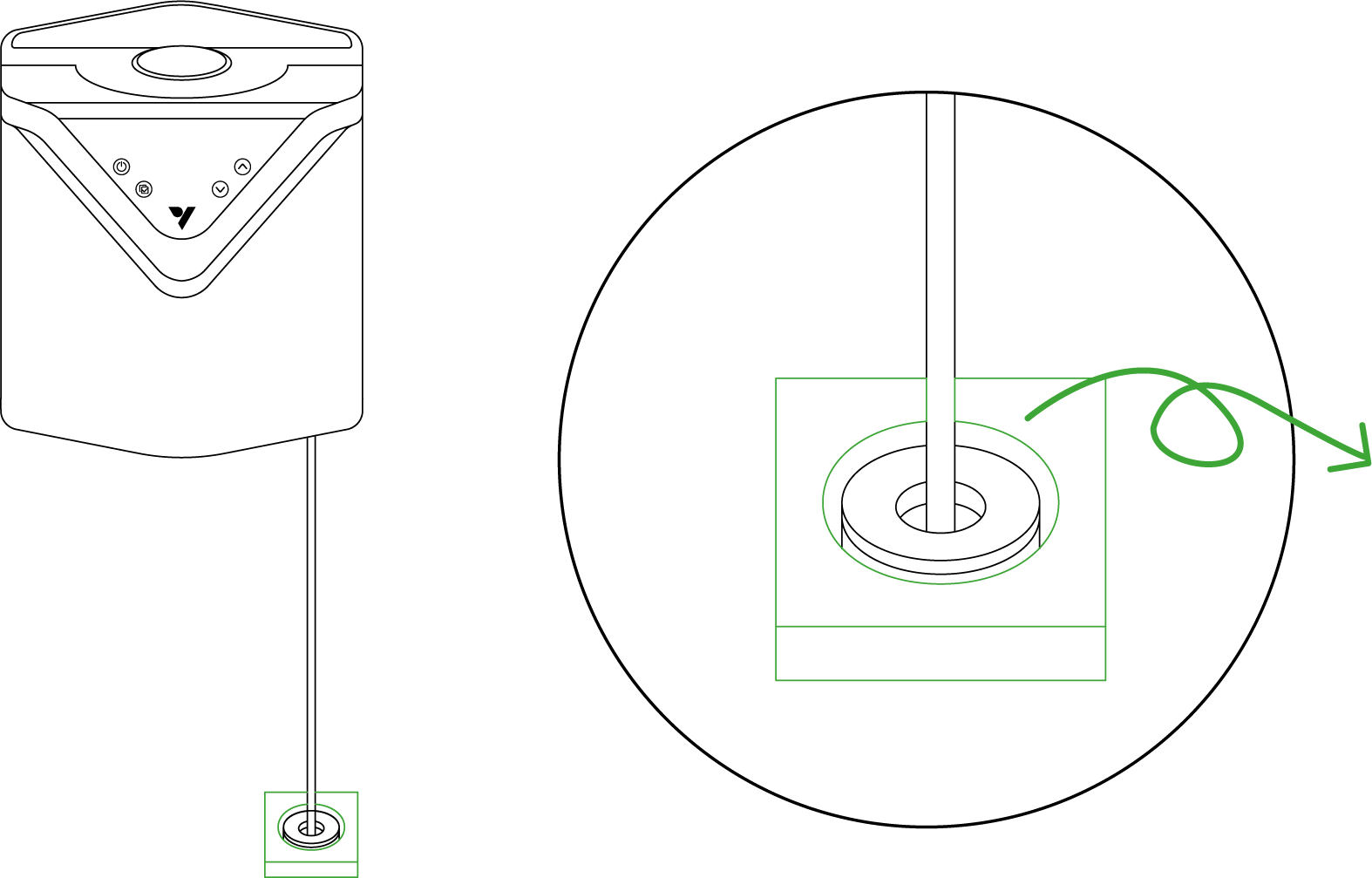
Before initial use, remove the humidifier from its packaging and discard the outer plastic wrap and protective foam. Make sure to remove the protective foam from the water pipe filter and retrieve the accessories from inside the water tank.
Step 2
Important Note: During the initial use of your humidifier, please allow a short priming period. The device will need a few moments to draw water from the water tank and fill the top module.
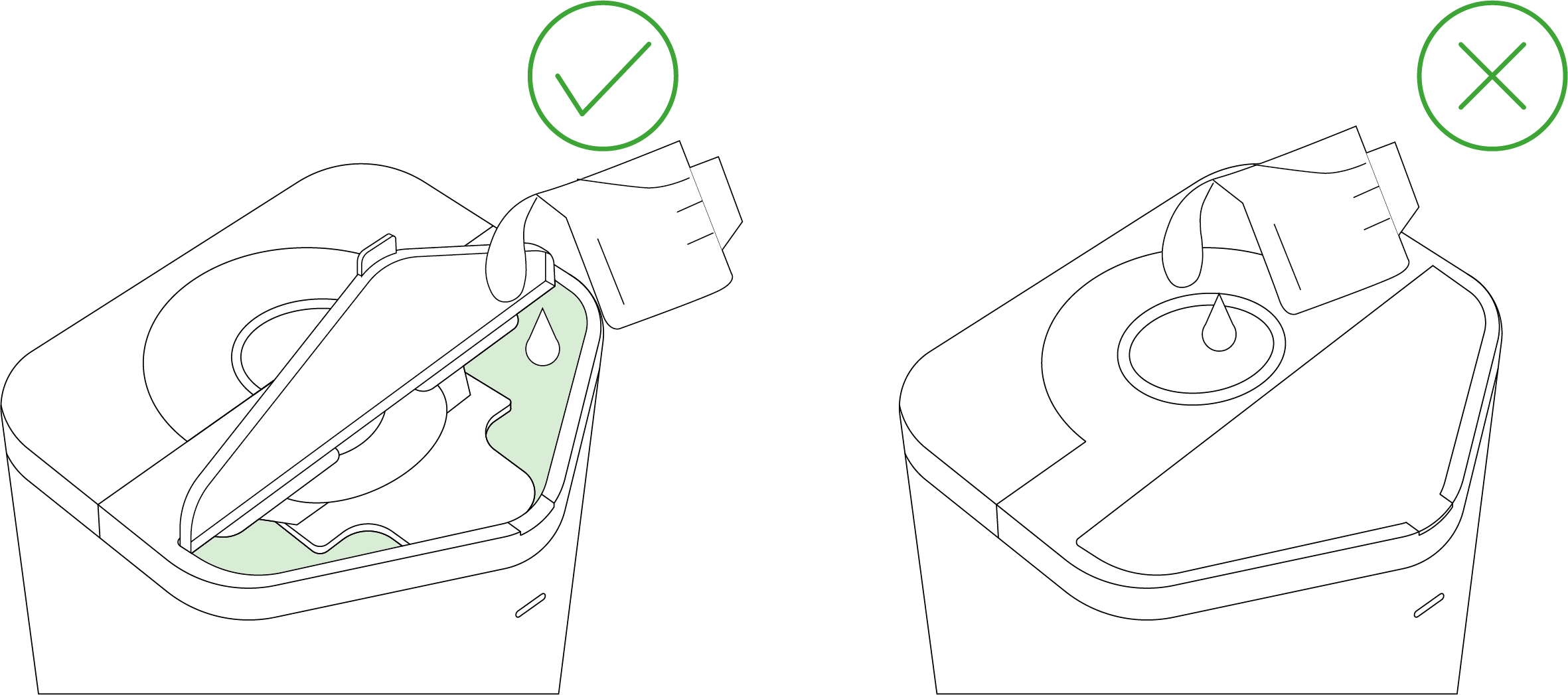
When filling the tank, please slowly add water from the sides. Observe water level markings when filling. Avoid overflow and spillage from filling too quickly. CAUTION: DO NOT pour water into the mist pipe. NOTE: For optimal performance, use DISTILLED WATER ONLY; Clean and maintain on a weekly basis.
Step 3
Depending on the usage scenario, install either straight pipe or flexible hose. The straight pipe can also be used in conjunction with various accessories.
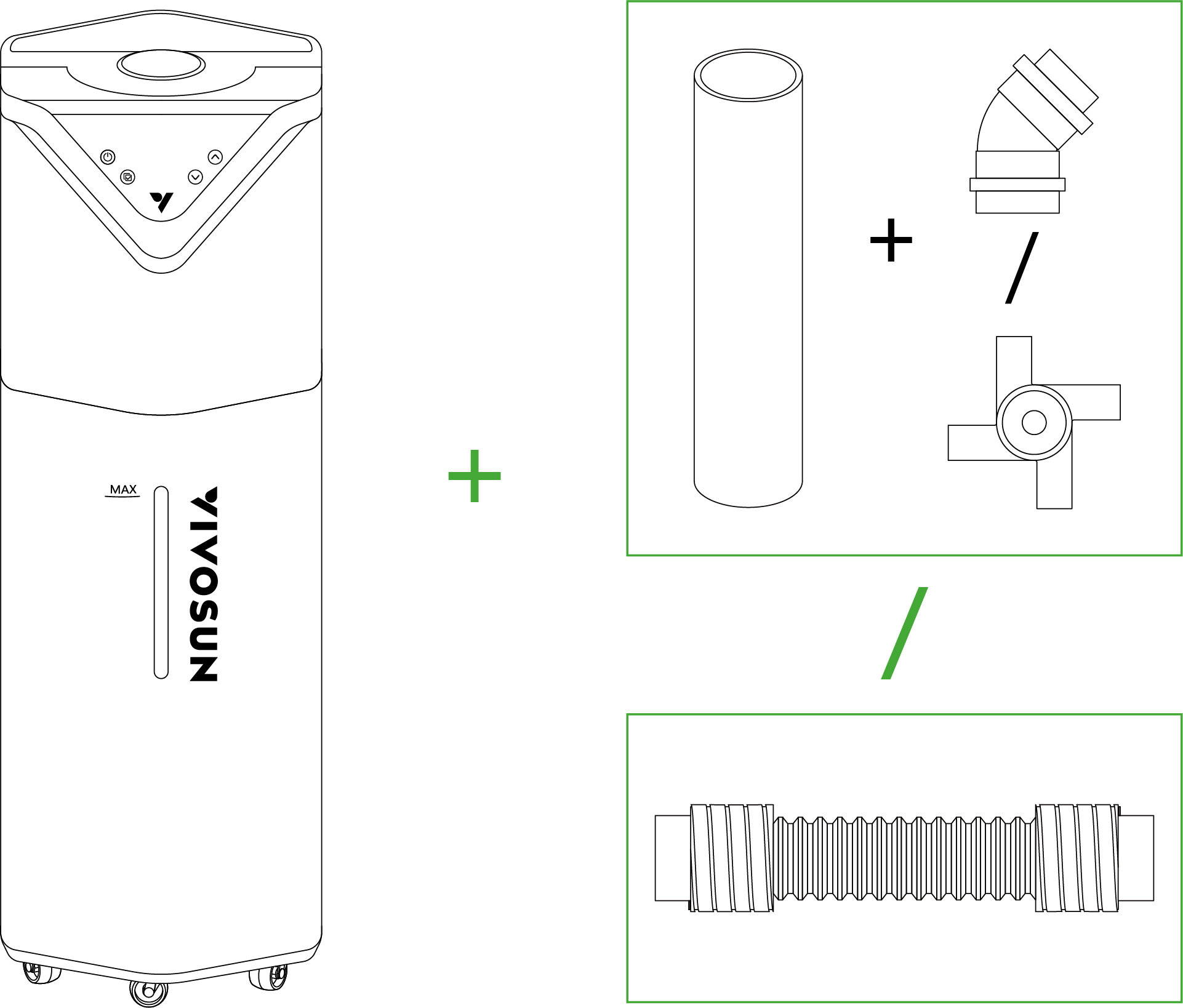
Warning: Under normal operating conditions, please refrain from tilting the machine or emptying water from the top module. Such actions may damage the top module and void the warranty.
SETUP
Step 1
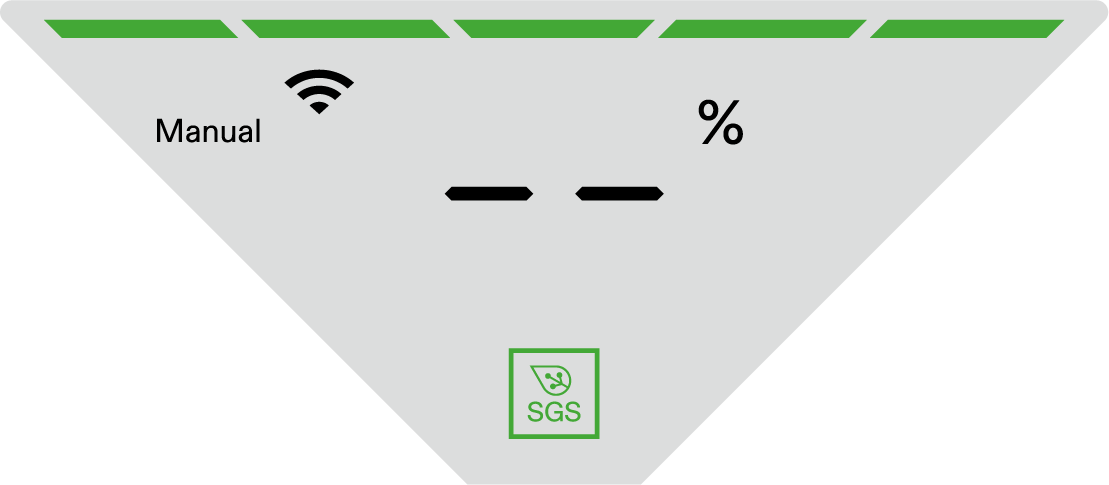
Insert the temperature and humidity probe into the 2.5mm jack located to the right of the power cord. Crucial Note: When inserting the jack, make sure to hear a distinct clicking noise. This clicking sound confirms that the jack is properly and securely locked into place. Point the probe at the desired area and secure it.

When the temperature and humidity probe is not connected, the screen will display "--".
Step 2
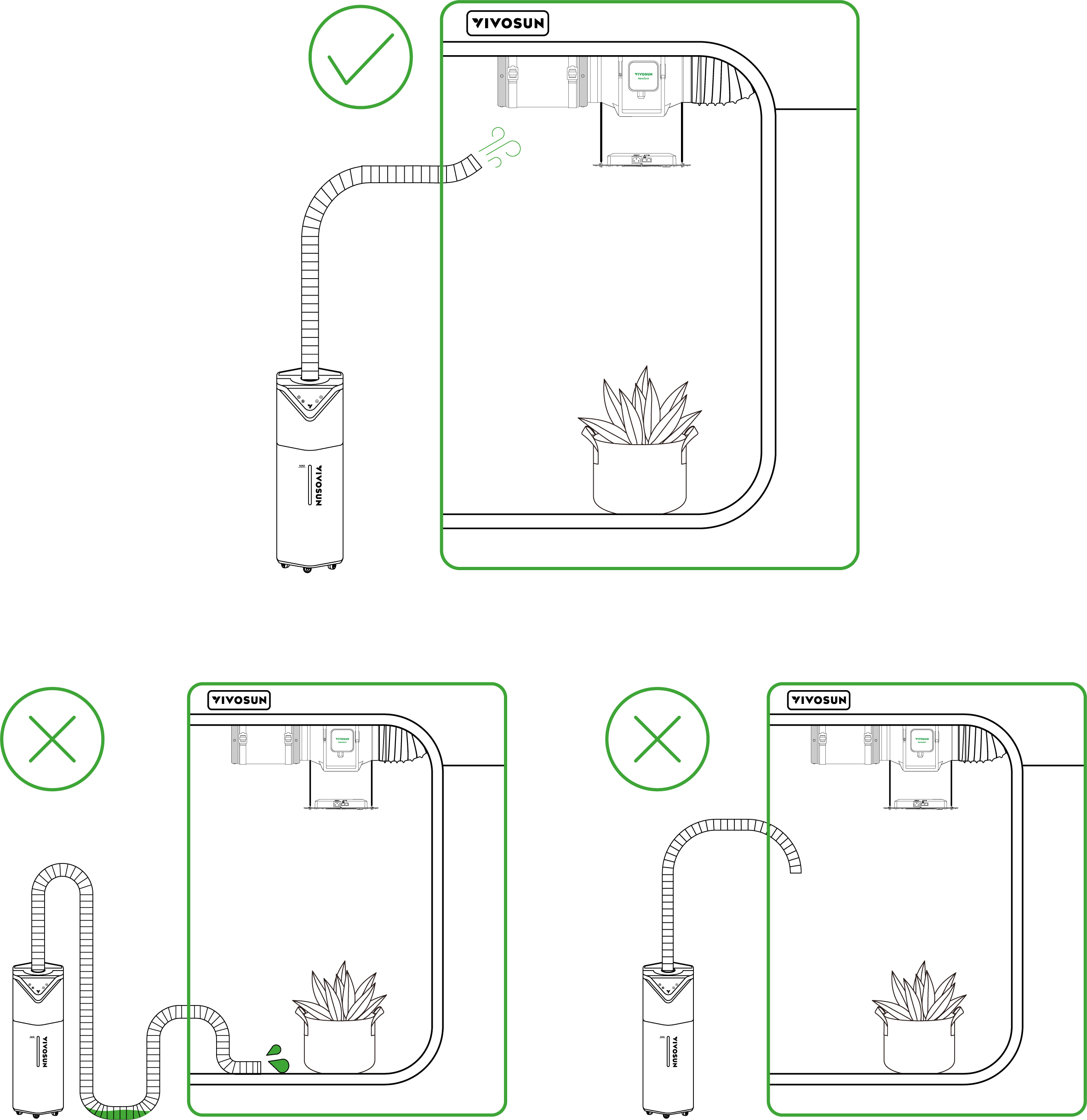
When using the flexible hose, please note the following:
-
Avoid creating U-bends in the hose, as this may cause water accumulation, leading to spillage and obstructing mist emission.
-
The mist outlet must always be pointed upwards.
-
Dry the hose after use.
Step 3
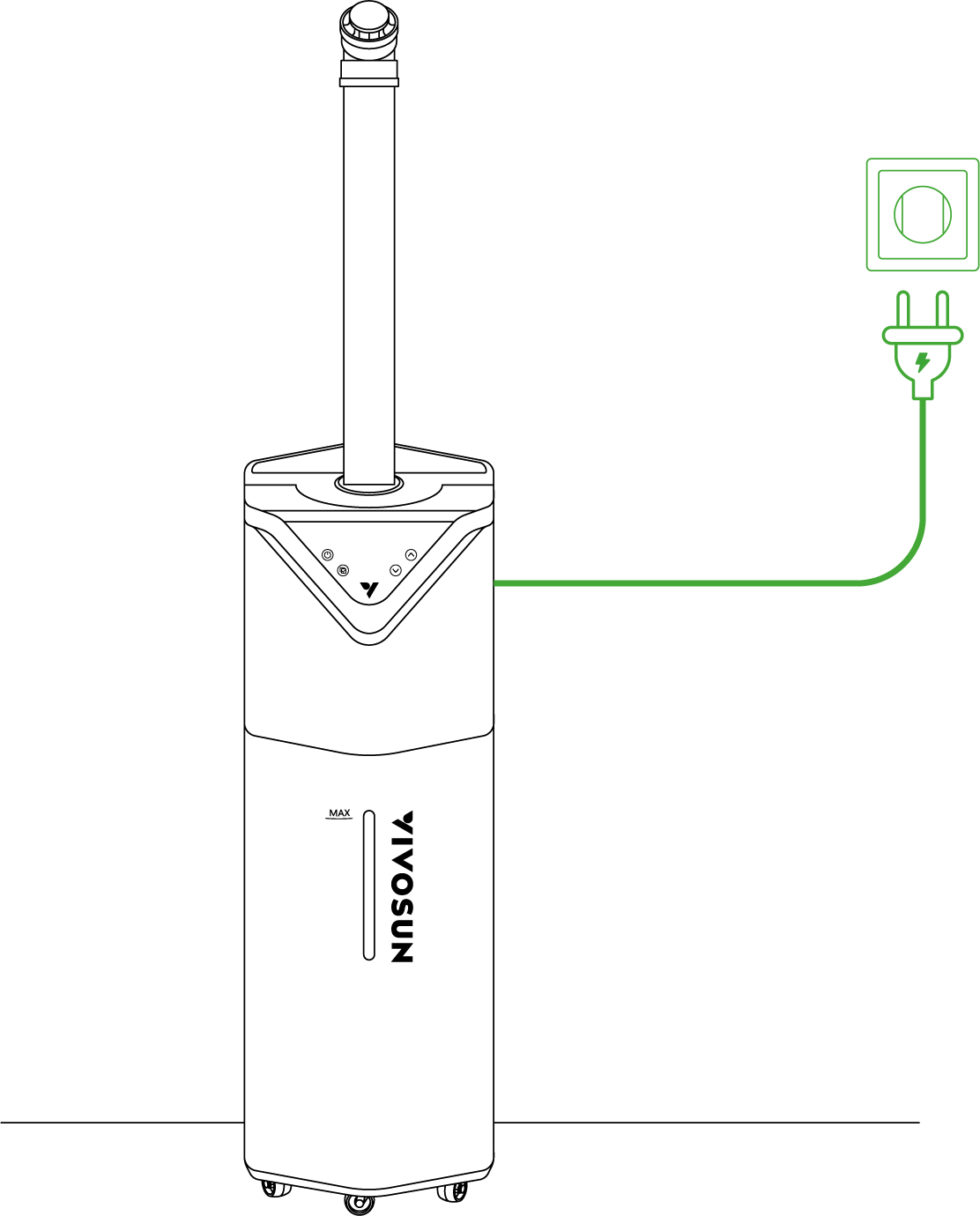
Once the power cord is plugged in and the desired mode is selected, you can start using the device.
CONTROL PANEL

|
On/Off Button |
Press to turn On. Press and hold for 3 seconds to turn Off. |
|
Menu/Confirm Button |
Press and hold the Menu Button to enable mode selection between Manual, Cycle, Auto and Timer. Press again to confirm. |
|
Up Button |
Press the Up Button to increase value of current setting (Mist Level, Time, etc.). |
|
Down Button |
Press the Down Button to decrease value of current setting (Mist Level, Time, etc.). |




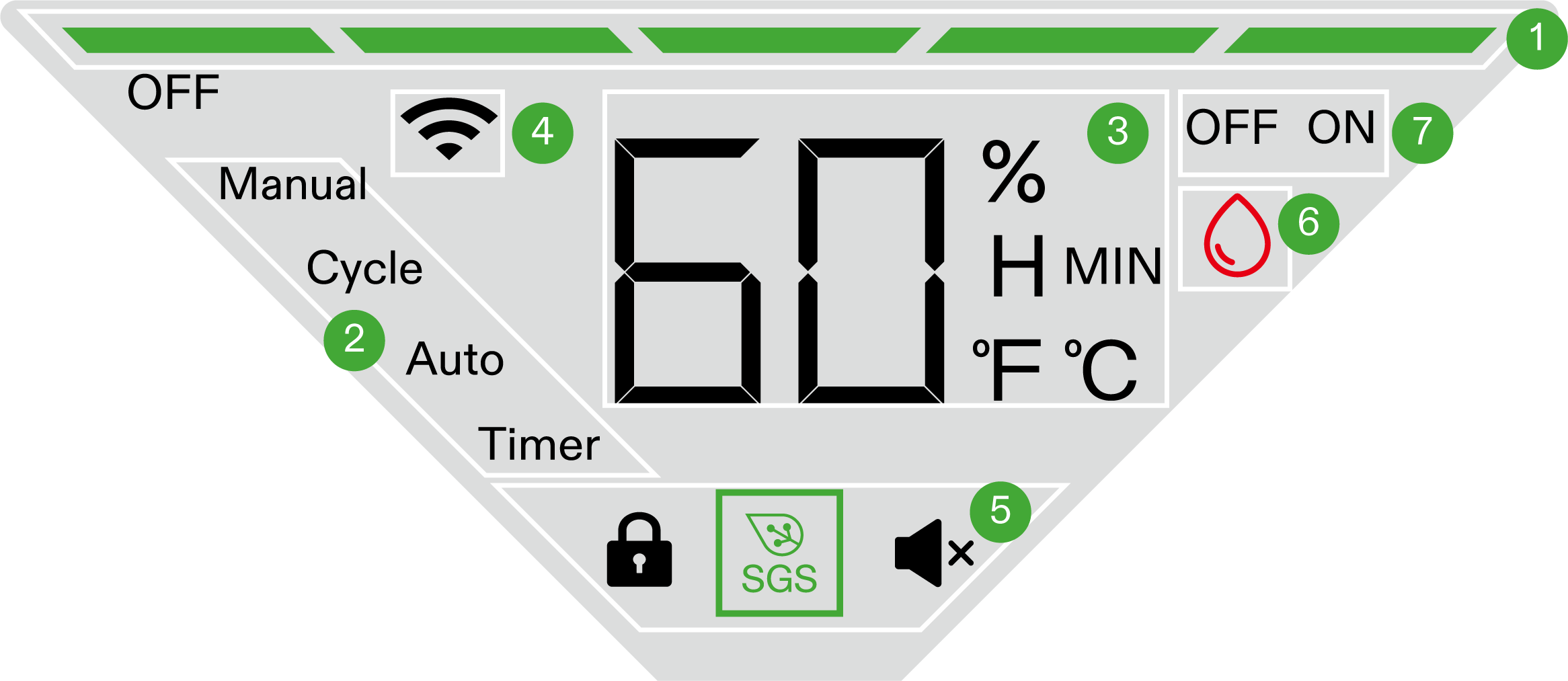
1 |
Mist Level |
Current Mist Level. |
2 |
Operating Modes |
Manual, Cycle, Auto, Timer. |
3 |
Probe Reading |
Alternately displays the current humidity and temperature. Displays remaining time in Cycle and Timer mode. |
4 |
Wifi Connectivity |
Indicates WiFi connection. No Wifi Icon indicates device is offline. Wifi Icon will flash when searching and connecting to a network. |
5 |
Status Icons |
Displays the device setting status, including (cloud) lock, mute, and SGS connectivity. |
6 |
Water Level Icon |
Displays the water level status of the device. When water level is low, the icon lights up. |
7 |
Operational Status |
OFF indicates the device is paused. ON indicates it is running. Operational duration is displayed when setting parameters in Cycle and Timer modes. |
Operating Modes
Manual Mode:
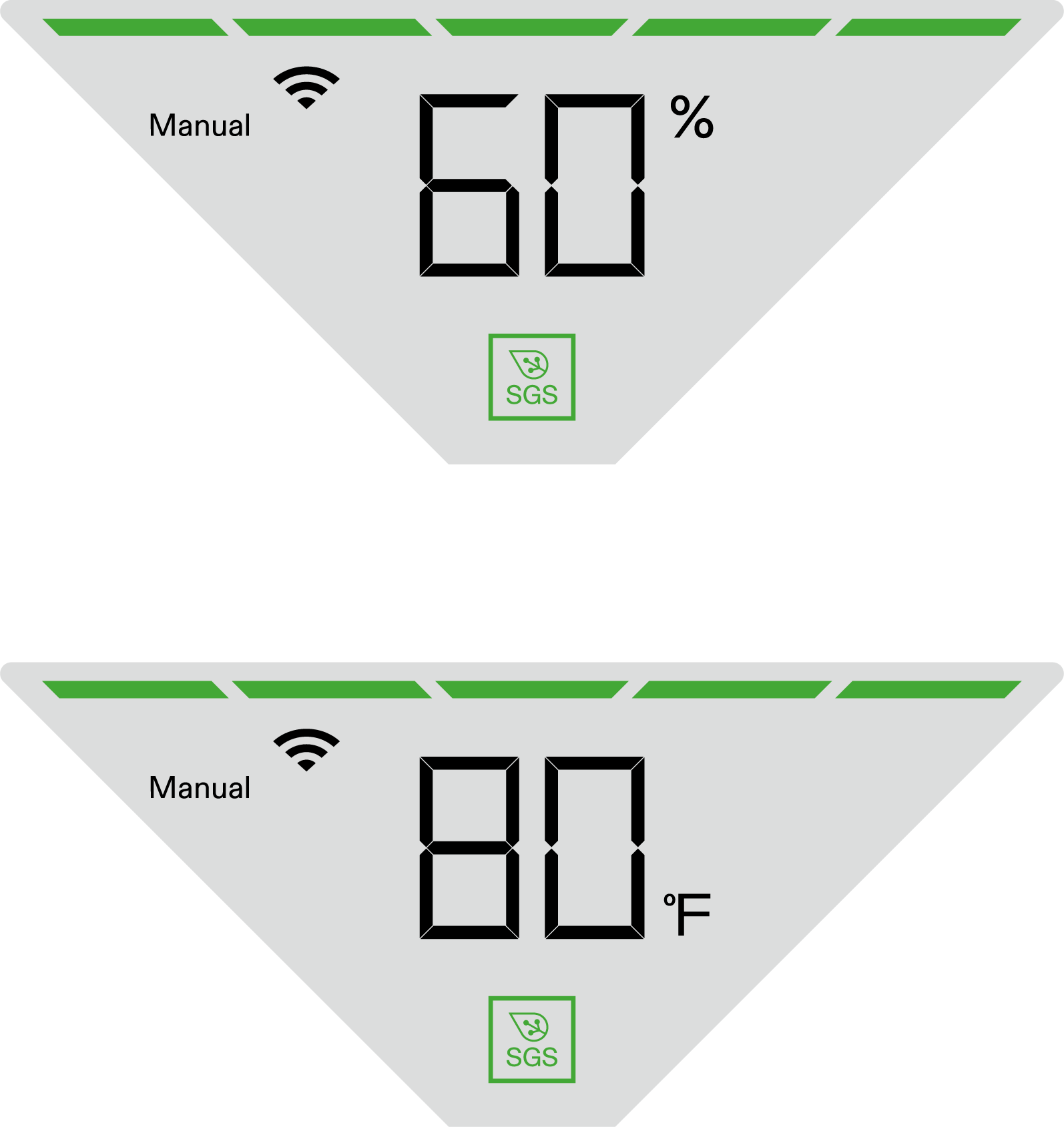
The device will operate according to the mist level set in Manual Mode.
Press and hold Menu button to enter Mode Selection. Press the Up or Down button to select Manual Mode and press Menu button again to confirm. Then set mist level using the Up/Down button and press Menu button to activate Manual Mode.
The screen will alternately display the mist level, current humidity, and temperature in this mode.
Cycle Mode:
The device will cycle and run continuously according to the set mist level and run/pause time.
Press and hold Menu button to enter Mode Selection. Press the Up or Down button to select Cycle Mode and press Menu button again to confirm. Set operating and rest duration (On and Off duration) by pressing Up/Down button and press Menu button to confirm. Then set mist level using the Up/Down button and press Menu button to activate Cycle Mode.
The screen will alternately display the mist level, current humidity, temperature, and remaining run/pause time of the device in this mode.
|
|
3H ON: Under this configuration, the device will operate for 3 hours. |
* 2H OFF: Under this configuration, the device will pause for 2 hours. |
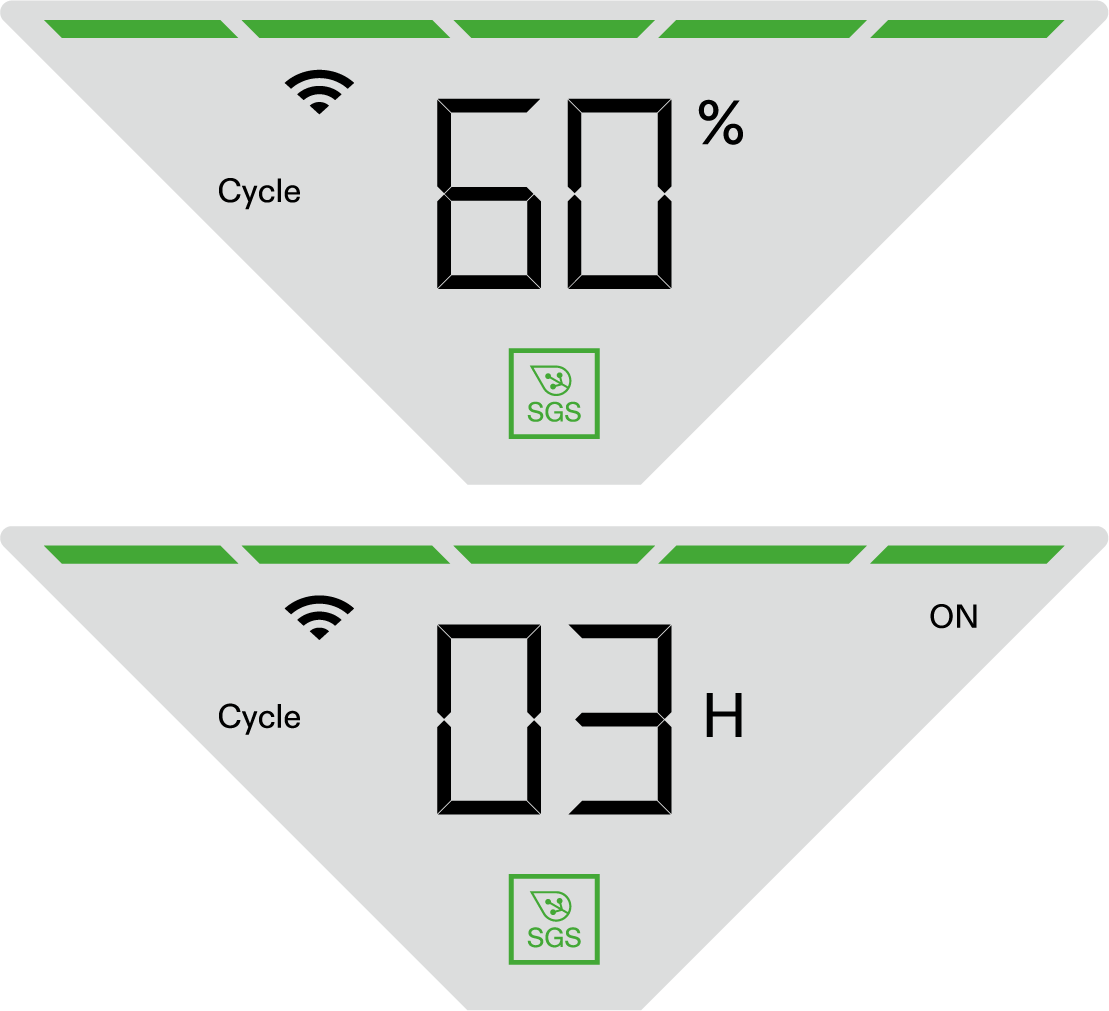

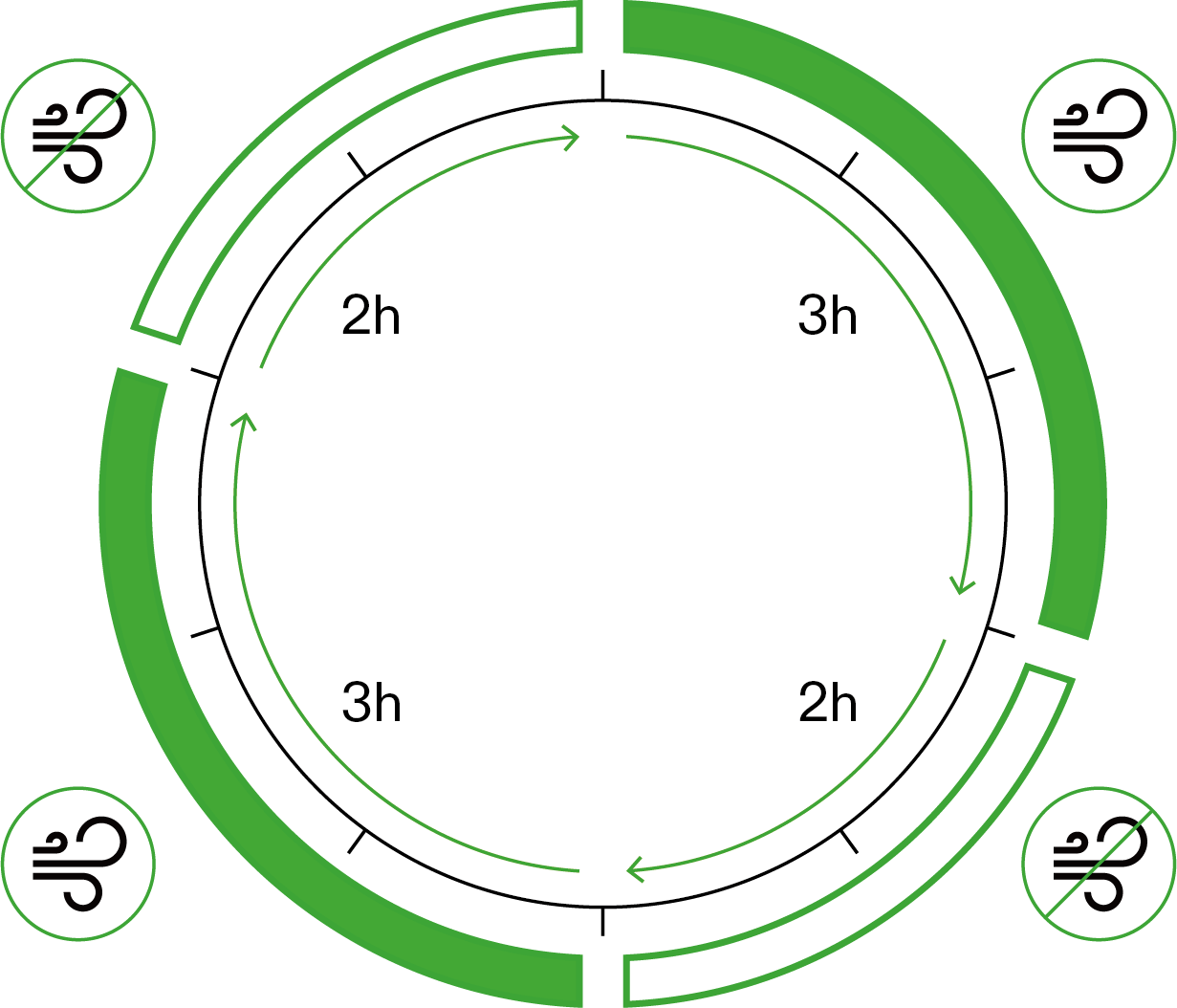
*The device only displays duration setting accurate to the hour and rounds up to the nearest whole number. For precise minute settings, please refer to the Vivosun app.
Auto Mode:
The device will operate according to the set mist level and humidity threshold (Low Humidity Trigger). Once humidity falls below the Low Humidity Trigger, the humidifier will start operating. Conversely, once humidity exceeds the Low Humidity Trigger, the humidifier will stop operating.
Press and hold Menu button to enter Mode Selection. Press the Up or Down button to select Auto Mode and press Menu button again to confirm. Set target humidity by pressing Up/Down button and press Menu button to confirm. Then set mist level using the Up/Down button and press Menu button to activate Auto Mode.
The screen will alternately display the mist level, current humidity, temperature, and operating status in this mode.
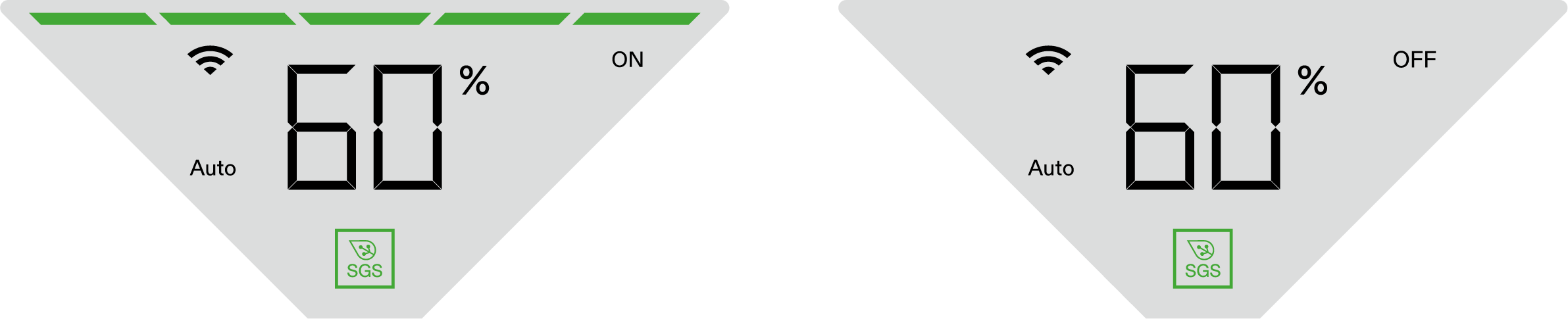
Humidity Trigger
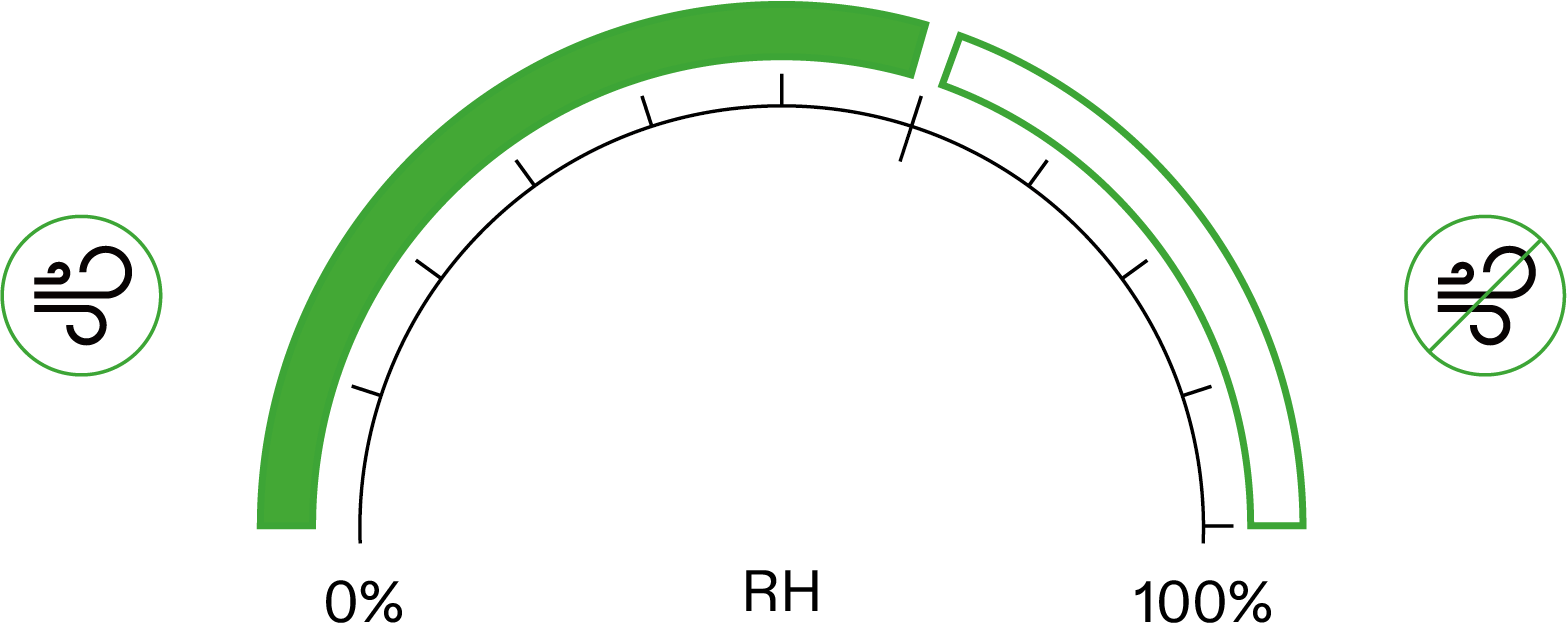
Timer Mode:
The device will operate according to the set mist level and time. After timer ends, the device will stop operating.
Press and hold Menu button to enter Mode Selection. Press the Up or Down button to select Timer Mode and press Menu button again to confirm. Set desired operating duration by pressing Up/Down button and press Menu button to confirm. Then set mist level using the Up/Down button and press Menu button to activate Timer Mode.
The screen will alternately display the mist level, current humidity, temperature, and remaining operating time of the device in this mode.
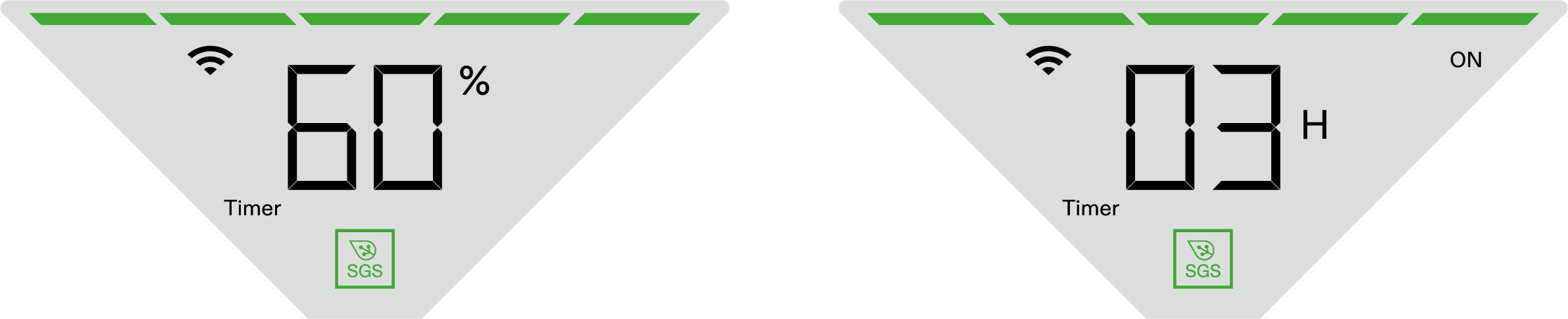
Time Trigger
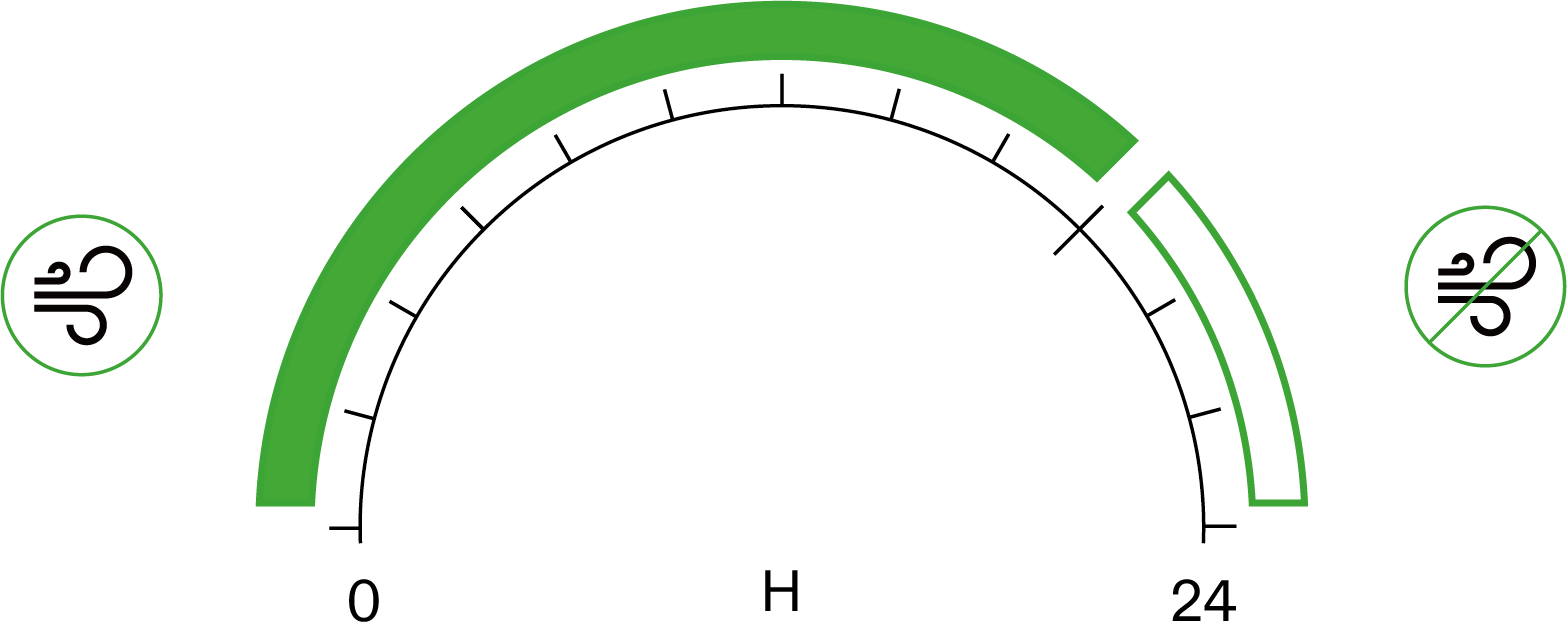
*The device only displays duration setting accurate to the hour and rounds up to the nearest whole number. For precise minute settings, please refer to the Vivosun app.
Other Settings
Function |
Operation |
Switch Temp Unit |
Press and hold Up Button to switch between °C and °F. |
Mute Device |
Press and hold Down Button to mute/unmute. |
Device Lock |
Press and hold On/Off and Up Button for 3 seconds to lock/unlock device. Note: When device is locked, settings cannot be adjusted. |
Phantom Mode (Hide Screen) |
Press and hold On/Off and Up Button for 3 seconds to lock device first; Press On/Off Button again to enter Phantom Mode (Hide Screen). Press any button to light up the control panel. |
Exit Recipe |
Press and hold Menu Button for 3 seconds to exit Recipe while Recipe is running. |
Screen Auto-Off |
Set Panel Auto-Off via Vivosun App |
Factory Reset |
Press and Hold On/Off and Menu Button for 3 seconds to reset device to factory settings. |
Other Settings
Low Water Level Alert
This Alert will display when water level is low. Device will pause operation when in this status until water is refilled. If the device is connected to Vivosun App, you will receive a low water level push notification.
Refill water and press On/Off Button to resume operation.
*At this point, the device will draw water from the water tank to the top module. The alert will remain illuminated until a sufficient amount of water is available to initiate operation. Alert Icon will flash if pressing any button.

WIFI CONFIGURATION
Connect AeroStream to VIVOSUN APP
Step 1: Download VIVOSUN APP
Search ''VIVOSUN'' in the Apple App Store or in the Google Play Store to download the VIVOSUN app.

Step 2. Add AeroStream
Tap ''+'' or  to add AeroStream. When connecting to VIVOSUN app,
  will flash on the control panel.
Note: Make sure you have a 2.4G WiFi connection, and that Bluetooth is enabled on your phone.
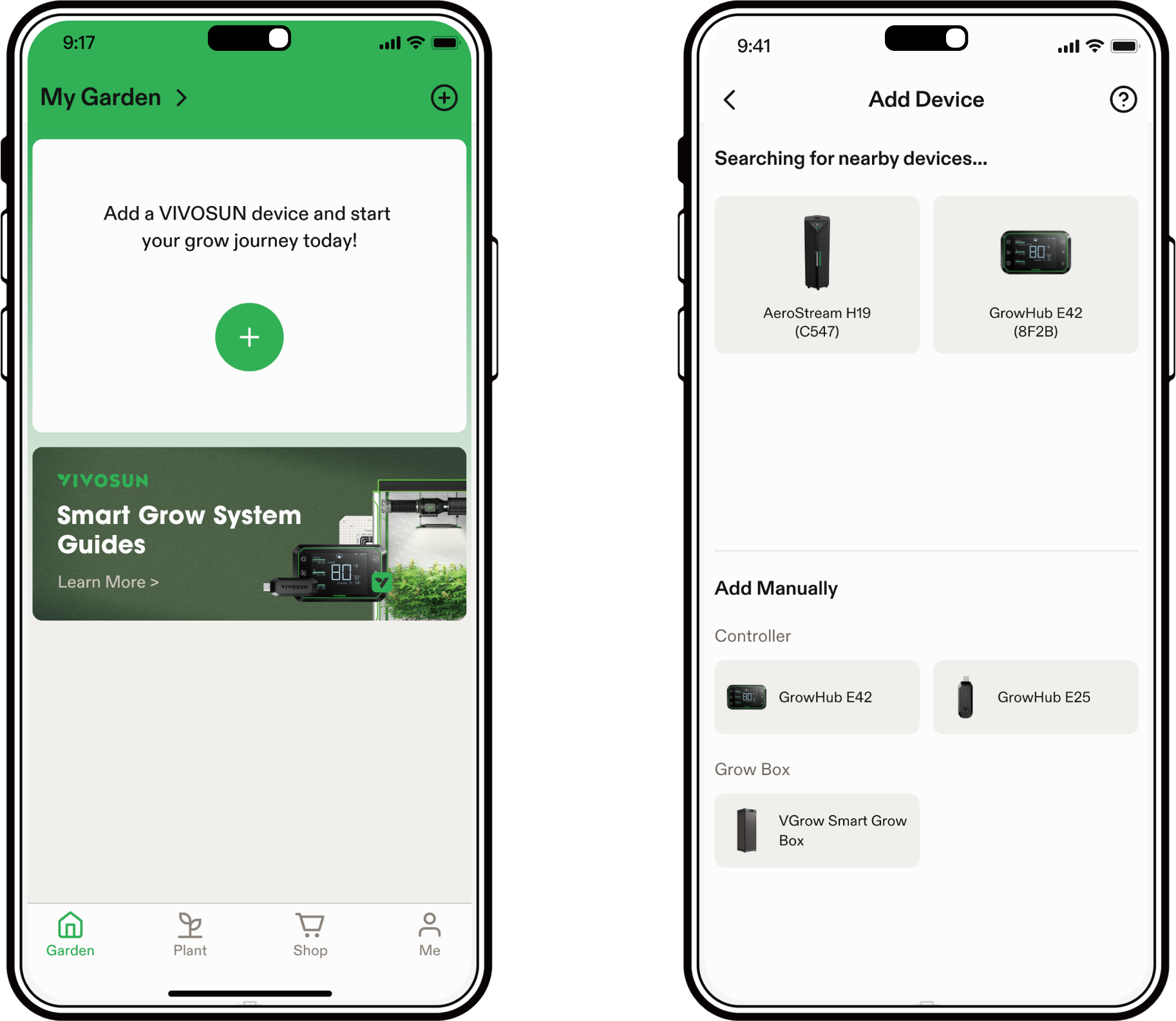
Step 3. Name Device
After connecting successfully, you can rename your device.
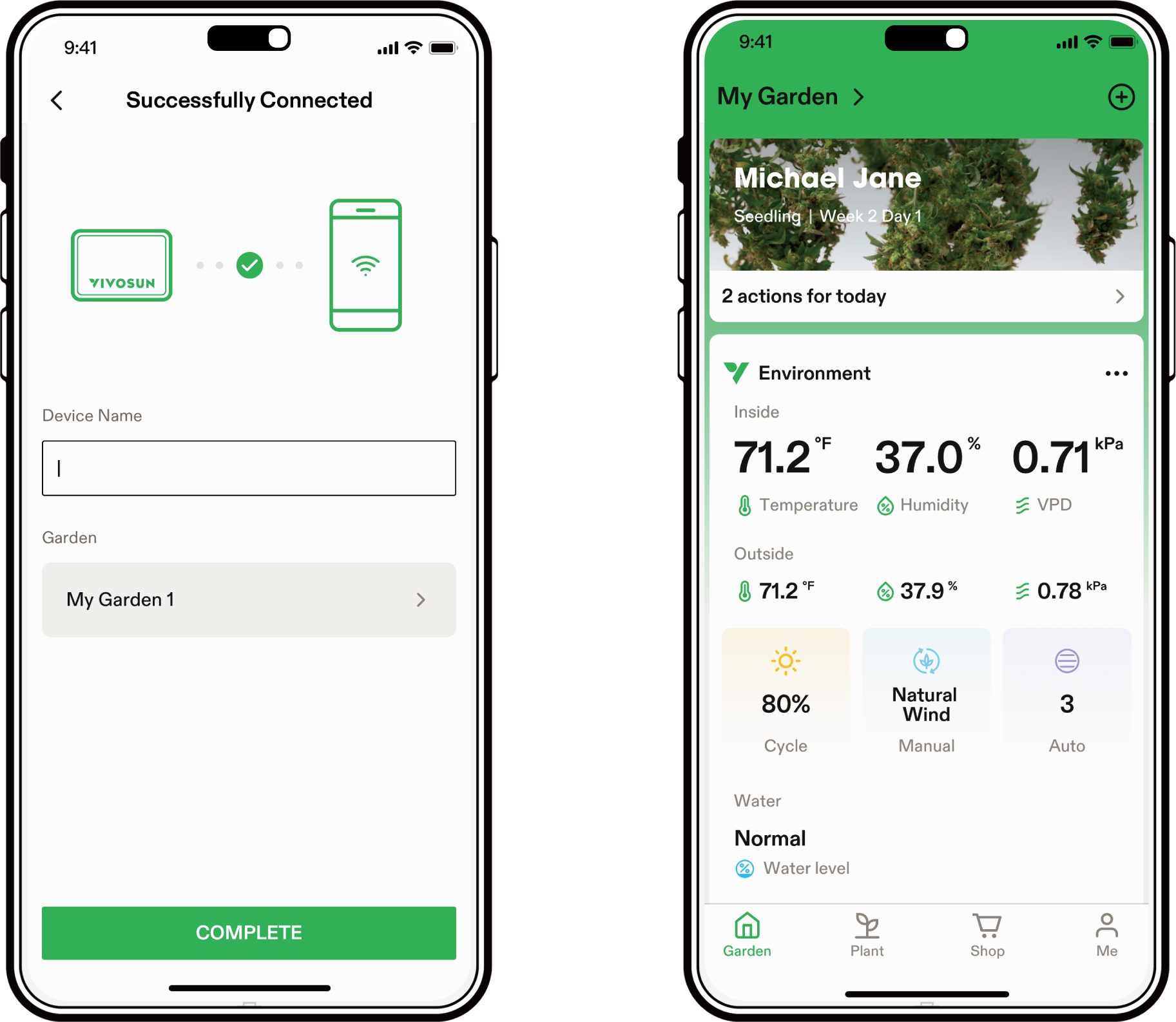
Maintenance
Step 1
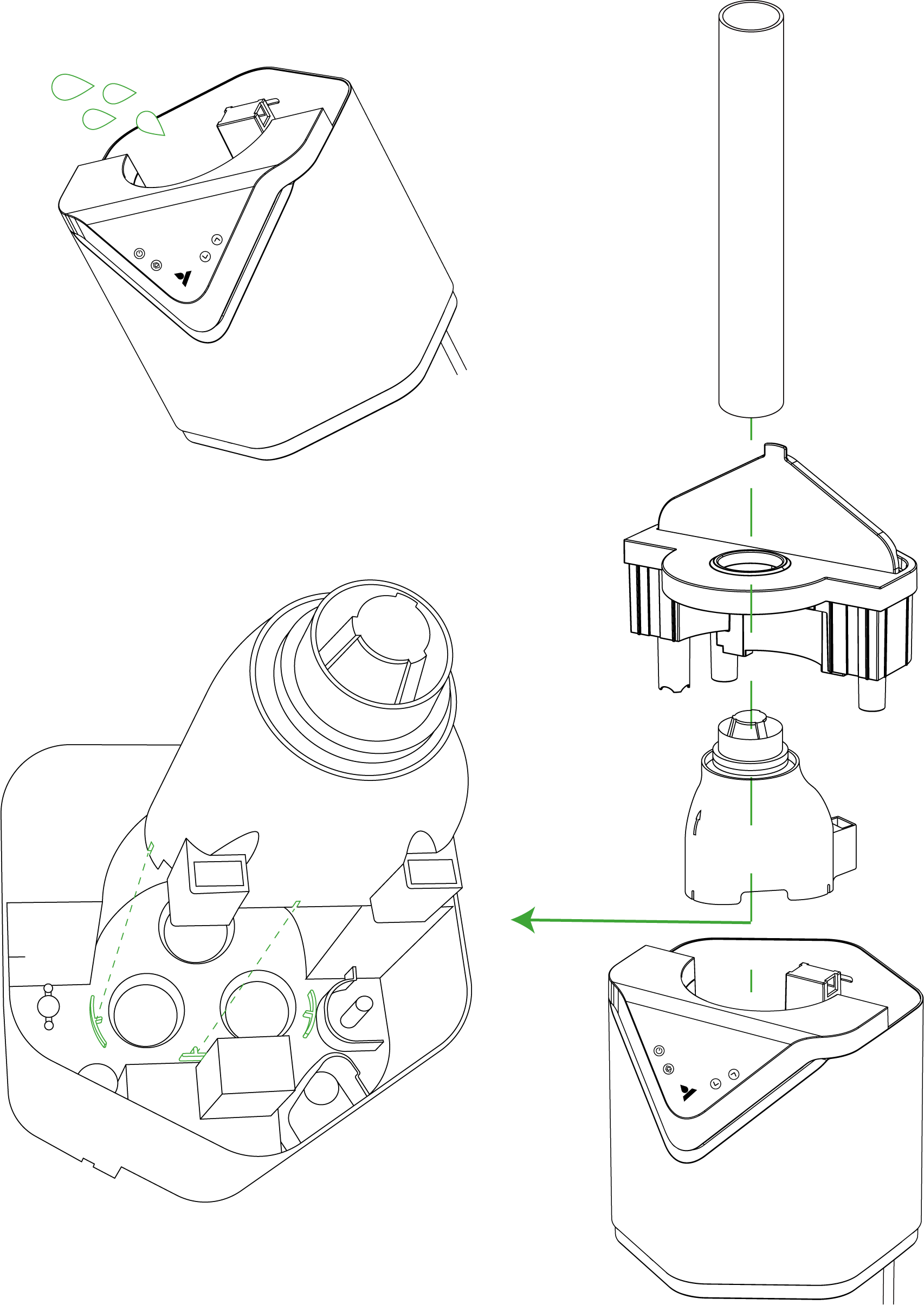
-Turn off the humidifier and unplug it from the power outlet. Detach the straight pipe/ flexible hose.
-Remove the water tank cover and mist channel. Place them in a sink for cleaning.
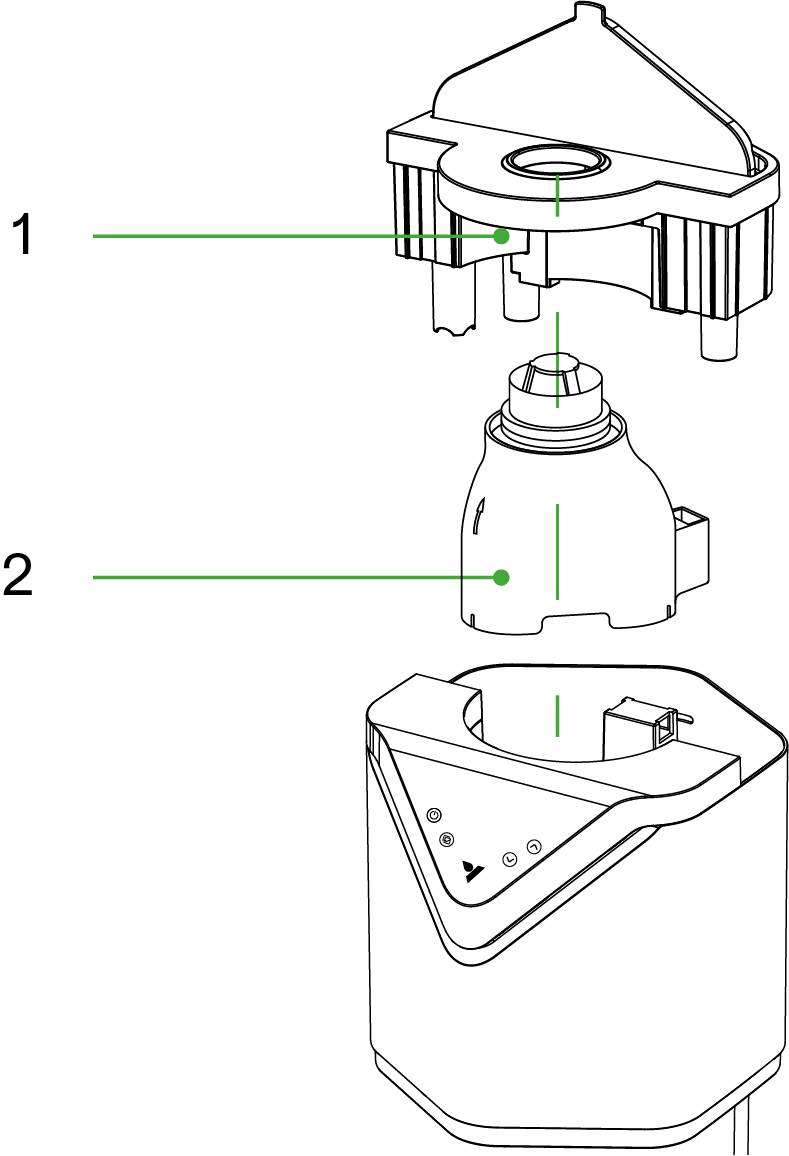
*1. Water Tank Cover
2. Mist Channel
Step 2
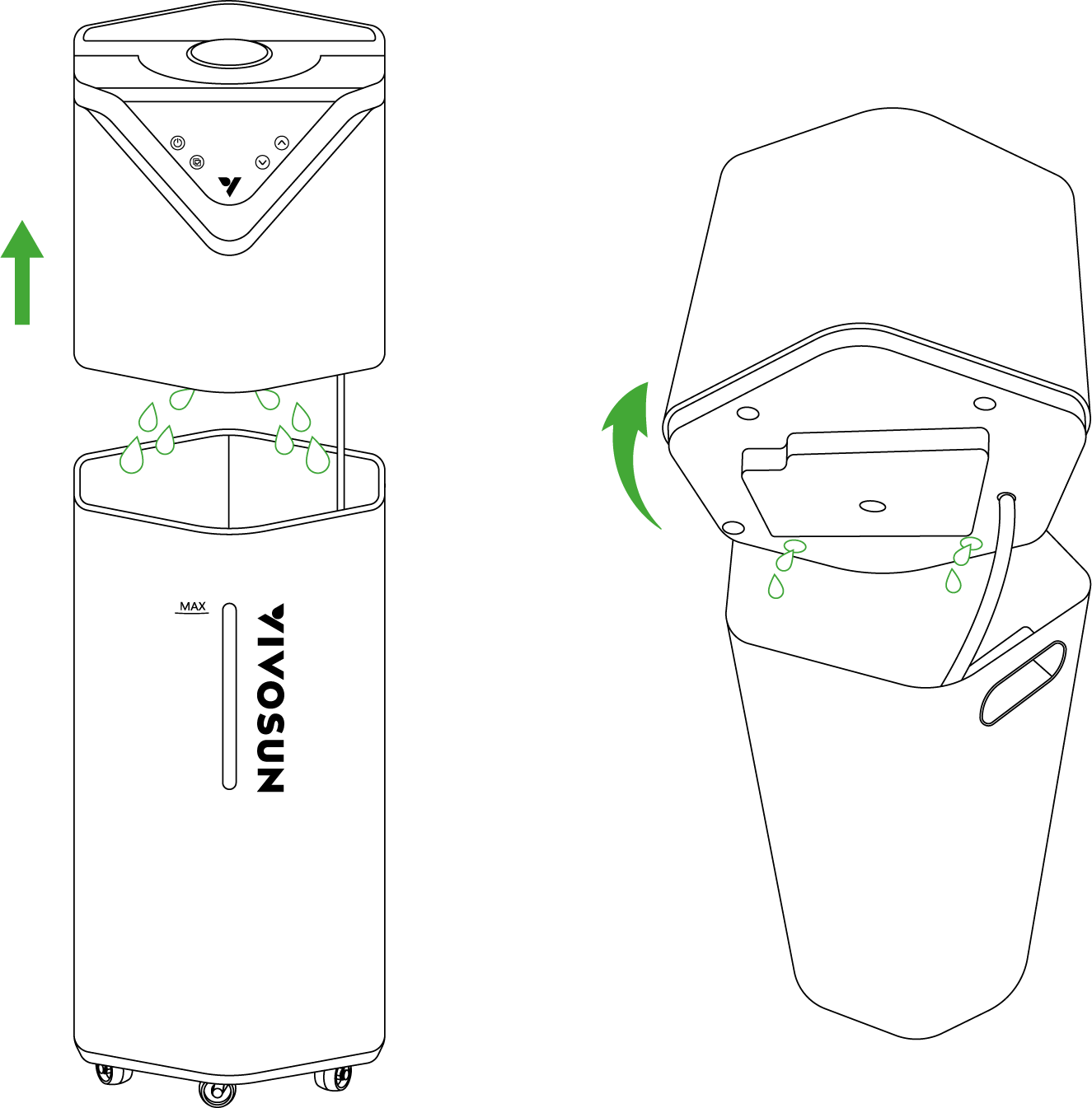
-Lift and tilt the top module.
-Pour the water from the top water reservoir through the funnel into the water tank.
-Empty any remaining water from the water tank.
Step 3
-Mix half a cup of distilled water and half a cup of vinegar in a 1:1 ratio.
-Pour the mixture into the top module.
-Wait 10 minutes.
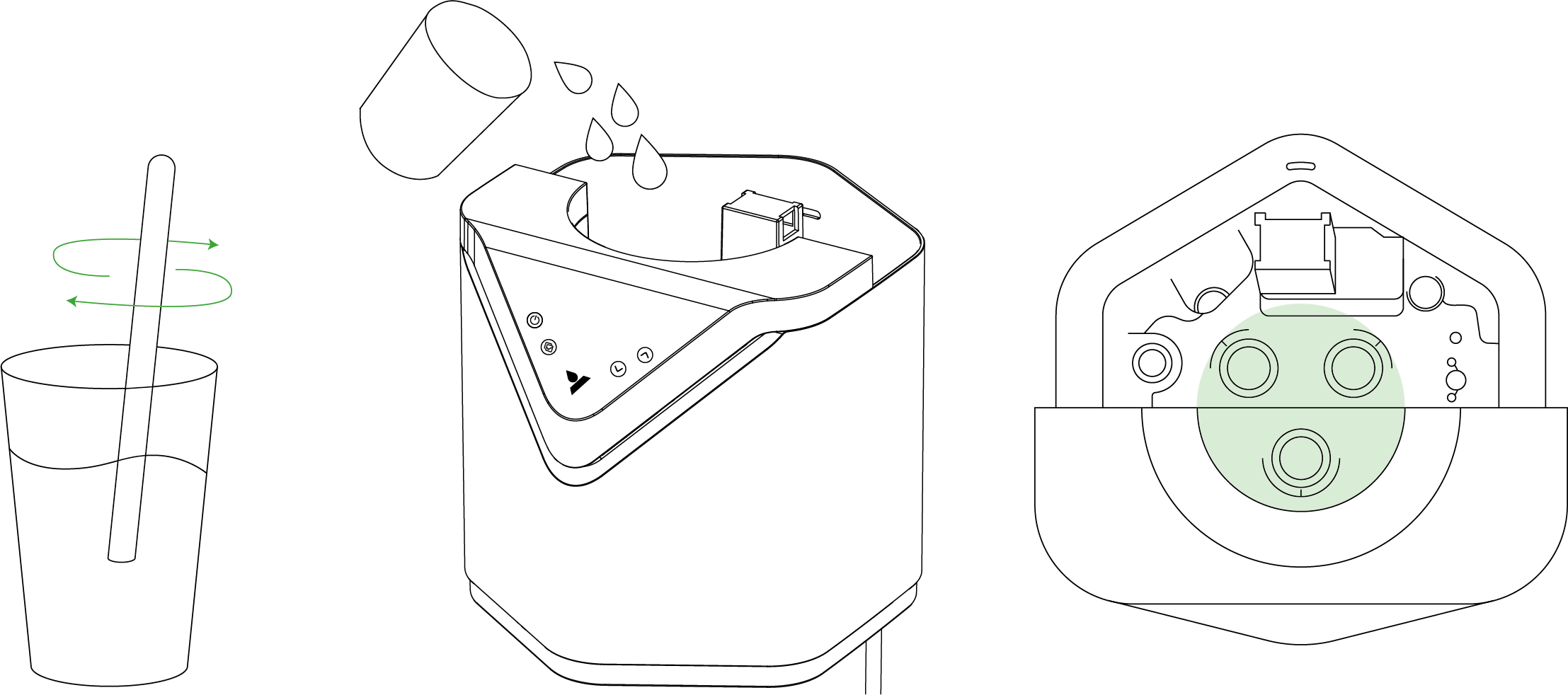
Distilled water + Vinegar
Step 4
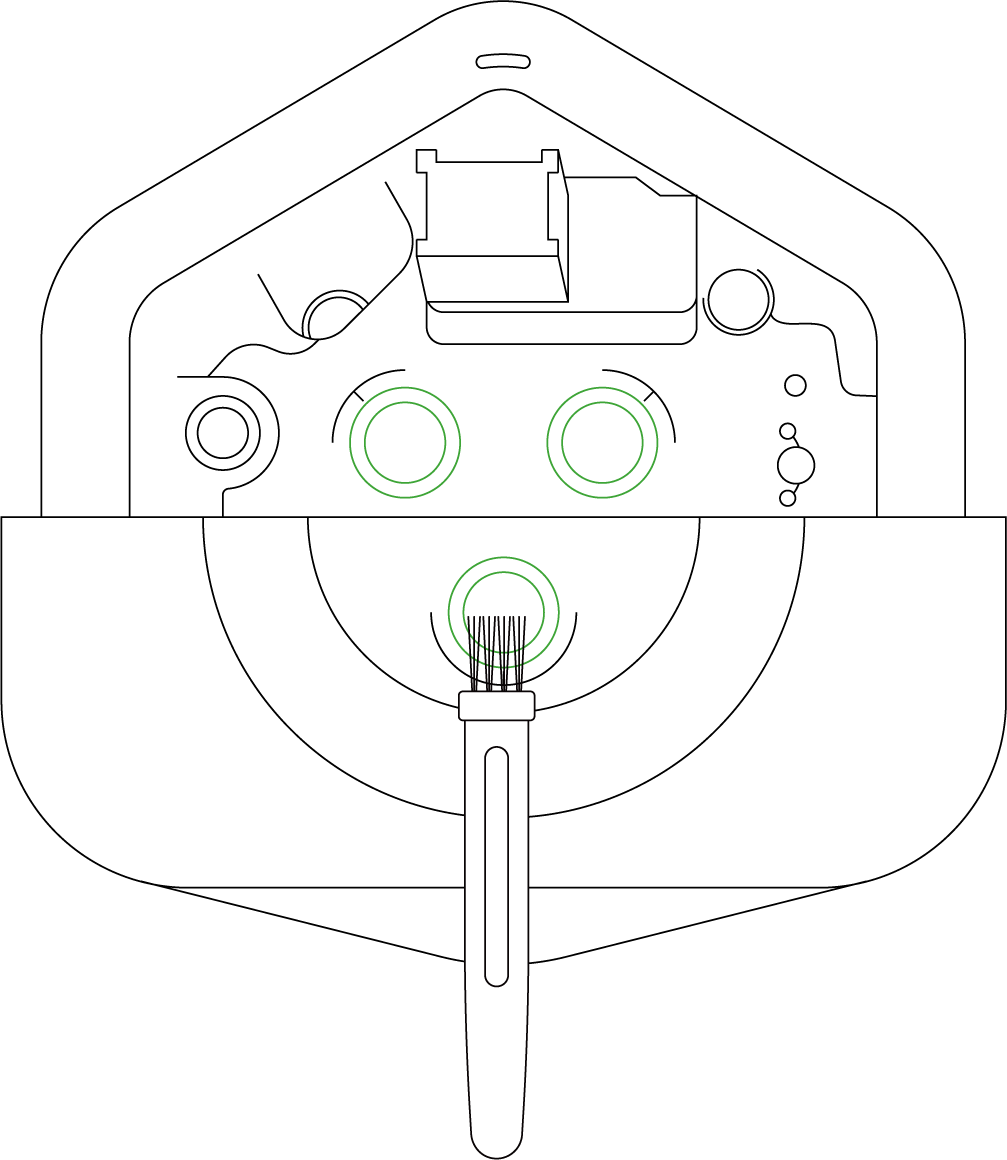
Use the included cleaning brush to gently scrub the three surface ionizers of the humidifier to remove any residue or debris.
Step 5
-Pour the mixture out of the top module.
-Use a clean towel to wipe the surface of the top module and the water tank.
-Reassemble the water tank, top module, mist channel (making sure it is inserted correctly), water tank cover, and hose/pipe in sequence.
Warning: After cleaning, please patiently wait for the device to draw water from the water tank to the top module, similar to the initial startup process.
Warranty
VIVOSUN offers a 2-year limited warranty on this product purchased directly from us or our authorized dealers, beginning on the original date of purchase.
This warranty is provided in addition to, and does not affect, your statutory rights under applicable consumer protection laws in the country where the product was purchased.
For the full Warranty Policy, please visit: https://www.vivosun.com/help/warranty-policy
Alternatively, you may contact customer service at support@vivosun.com / +1 888-505-8486.
FCC Warning
This equipment has been tested and found to comply with the limits for a Class B digital device, pursuant to part 15 of the FCC Rules. These limits are designed to provide reasonable protection against harmful interference in a residential installation. This equipment generates, uses and can radiate radio frequency energy and, if not installed and used in accordance with the instructions, may cause harmful interference to radio communications. However, there is no guarantee that interference will not occur in a particular installation. If this equipment does cause harmful interference to radio or television reception, which can be determined by turning the equipment off and on, the user is encouraged to try to correct the interference by one or more of the following measures:
-
Reorient or relocate the receiving antenna.
-
Increase the separation between the equipment and receiver.
-
Connect the equipment into an outlet on a circuit different from that to which the receiver is connected.
-
Consult the dealer or an experienced radio/TV technician for help.
Caution: Any changes or modifications to this device not explicitly approved by manufacturer could void your authority to operate this equipment.
This device complies with part 15 of the FCC Rules. Operation is subject to the following two conditions:
(1) This device may not cause harmful interference, and (2) this device must accept any interference received, including interference that may cause undesired operation. This equipment complies with FCC radiation exposure limits set forth for an uncontrolled environment. This equipment should be installed and operated with minimum distance 20cm between the radiator and your body.
ISED Statement
English: This device contains licence-exempt transmitter(s)/receiver(s) that comply with Innovation, Science and Economic Development Canada’s licence-exempt RSS(s). Operation is subject to the following two conditions:
(1) This device may not cause interference.
(2) This device must accept any interference, including interference that may cause undesired operation of the device.
French: Cet appareil contient des émetteurs/récepteurs exempts de licence qui sont conformes aux CNR exempts de licence d’Innovation, Sciences et Développement économique Canada. Le fonctionnement est soumis aux deux conditions suivantes :
(1) Cet appareil ne doit pas causer d’interférences.
(2) Cet appareil doit accepter toute interférence, y compris les interférences susceptibles de provoquer un fonctionnement indésirable de l’appareil.
This device meets the exemption from the routine evaluation limits in section 2.5 of RSS 102 and compliance with RSS 102 RF exposure, users can obtain Canadian information on RF exposure and compliance.
cet appareil est conforme à l’exemption des limites d’évaluation courante dans la section 2.5 du cnr - 102 et conformité avec rss 102 de l’exposition aux rf, les utilisateurs peuvent obtenir des données canadiennes sur l’exposition aux champs rf et la conformité.
This equipment complies with Canada radiation exposure limits set forth for an uncontrolled environment.
This equipment should be installed and operated with minimum distance 20cm between the radiator & your body.
Cet équipement est conforme Canada limites d’exposition aux radiations dans un environnement non contrôlé.
Cet équipement doit être installé et utilisé avec une distance minimale de 20 cm entre le radiateur et votre corps.[tree]
If any product defects are found, customers are encouraged to contact us immediately. Your satisfaction is our priority, and we are committed to resolving any issues in a professional and timely manner.
Contents

We help you grow your best green.

We provide the highest quality.

We relentlessly pursue the future.

We make growing more enjoyable.

We support every grower.
Sign up and get 8% off your first order
©2026 Vivosun All Rights Reserved